Showing posts with label sub-hood. Show all posts

Sunday, December 11, 2011

Balloth-Information & Download


Update: Oct 2010 - according to Mootilda's subhood tutorial.
Update: Oct/Nov 2011 - according to Mootilda's HoodChecker program.


Note: Some Sims in this subhood share the same Life Time Want, some also share the same zodiac sign. This was not intentional, families were made by different people who in turn gave them personalities, and that is what ultimately decides these things. If this bothers you, the LTW can be changed in-game by using the ReNuYu Senso Orb aspiration reward object.


To change just the LTW with a hack, you could try the college clock or the ffs debugger from MATY. You do not need to register in order to download, to find them go to the main page, then find Awesomeware/The Armory/Hack Directory - All Hacks/and click whichever is your latest EP/hacks, and find whatever you want from the list you'll see there.

To change both the LTW and the zodiac sign try either of these:
Sim Blender by twojeffs
Sim Manipulator by Aaroneous
Note that both sites will require registration.

Balloth was made using Numenor’s AnyGameStarter program, with a base game and OfB set up. It requires Open for Business but is compatible with other EP's.
Any neighborhood already associated with Bluewater or any other business district will remain so; this new district will not affect your existing neighborhoods. Subsequently any neighborhood you now associate with Balloth will keep its attachment and will require you to delete it in game via the trashcan icon if you want to remove it.

Installation Instructions
Go to your Program Files\EA GAMES\The Sims 2 Open for Business\TSData\Res\NeighborhoodTemplate. Place the B628 folder into the NeighborhoodTemplate folder. *NOT* into your my Documents\EA Games\The Sims 2\Neighborhoods folders.

When you start your game and choose to add an Open for Business subdistrict, Balloth will appear in the menu, click on the arrow to add Balloth.

To allow Balloth to show up in your menu and stop the big blue button from getting in your way, please use Mootilda's hack. Also many thanks go to Mootilda at MTS for her Subhood Tutorial, and for her HoodChecker program. Links can be found in the list to the right of this page.


Download Fixed_Balloth here.

Balloth has been packed as a Rar file; you'll need a program such as WinRar or ExtractNow to unpack it. If you have any concerns, feel free to use the contact details that are available here, or if you'd rather then you can email me personally: lechapeau@blueyonder.co.uk

Balloth-Extra EP Lots


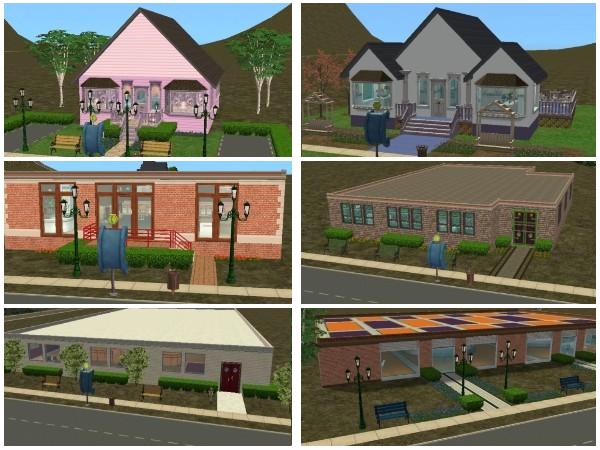
Stuff pack items (from Celebration, HandM, maybe Teen Style) were used to make or decorate many of the extra EP lots. Stuff packs don't alter the game coding in the same way an Expansion Pack does, so if you don't have one of the SP's the lots shouldn't crash, but any SP items the lot would have contained will be missing.

There are four houses and six business lots, further information is included with the files.


Download Balloth Extra EP Lots

Download-Prometedor


Update: Oct 2010 - according to Mootilda's subhood tutorial.
Update: Oct/Nov 2011 - according to Mootilda's HoodChecker program.


Hola! Welcome to Prometedor!
Made on an edited version of the Belladonna template, this is an island vacation subhood for The Sims 2 Bon Voyage. It contains 10 of each local and tourist custom made sims and has a Baja Coast/Spanish/Mexican feel, with buildings here being inspired by images from those areas.
It has been designed to complement the Beacon Falls hood, but it can be added to any neighbourhood, alongside the existing holiday destinations.
Prometedor now contains a secret vacation lot. See the Read Me file for further details.

Installation instructions
These are the same as those already posted on the page for Isle St Croix, but in a nutshell:
Back up your game.
Place the T609 folder into your Program Files\EA GAMES\The Sims 2 Bon Voyage\TSData\Res\NeighborhoodTemplate, NOT into your My Documents\EA Games folder.


If you are only installing this BV sub district, it should show up in your game once it has been placed in the correct Program Files folder. If you can't see it in the selection menu then please download Mootilda's hack . This allows further Bon Voyage sub districts to show up in your menu, rather than swapping out files in order for them to show properly.


Download Fixed_Prometedor here

(Approx size 31Mb) All files are in Rar format and you'll need something like WinRar or Extract Now to unpack them.

Prometedor Add-on's, Alternative and 1 New Lot


Prometedor 3 Extra Lots
The Abode Cafe and Inn (Requires AL) and was made by billybop428 at TSR, Mundo de Agua and Campanas de Boda were made by lechapeau.

Download all 3 add-on lots in one rar file

Smaller Chichen

Alternate Chichen, you can see this
on the left hand side of the picture, it sits on a 3x3 lot, and was made for those whose computers can't take the larger version which can be seen on the right!


New Up2MandG_Recinto Ferial
Requires Mansions and Gardens, but was made with all other EP's and SP's installed. If you are missing any of those, then please check the lots before sending Sims to visit, so that you can redecorate or replace any non showing items. The folder you download has two versions of the same lot: one containing all the necessary CC, and one without it, but with it all in a folder for you to install separately.
You are strongly advised to read the explanation included with the download.


Download Up2MandG_Recinto Ferial

With thanks and credit to Echo for the updated Carnival Set, and for the Pretty Ride-on Carousel, with credit to Hexameter for the carousel sound. Thanks and credit also to Jasana BugBreeder for the Ferris Wheel.

Download-Isle St Croix


Update: Oct 2010 - Completely remade, according to Mootilda's subhood tutorial.
Update: Oct/Nov 2011 - checked and found safe with Mootilda's HoodChecker program.


Isle St Croix is a custom made mountain vacation resort for the Sims 2 Bon Voyage. It was designed to complement the Beacon Falls hood, but can be added to any neighbourhood you choose, alongside the existing holiday destinations.
There is now a version of this subhood available at Mod The Sims, the one here is lager than the one there, but otherwise they are both exactly the same.


For your own benefit, and *BEFORE INSTALLING* this neighborhood, please Back-Up your My documents\EA Games folder. If anything were to go wrong, delete your current My Documents\EA Games folder and replace it with the back up.
NEVER overwrite a neighborhood folder, that would CORRUPT THE NEIGHBORHOOD AND MAKE IT UNUSABLE. Isle St. Croix should be safe, this is 'just in case' advice if anything should go wrong.


Nothing else needs deleting/moving or backing up in your Program Files folder, Isle St. Croix will not replace any of your Bon Voyage destinations as it has a different ID and folder number. It will be available as a choice in the list of vacation destinations when you click to choose a holiday neighborhood. This won't affect any other holiday destinations, it is 'as well as' and not instead of any Bon Voyage neighborhood that you currently play.

This default neighborhood has been made with AnyGameStarter using Uni/NL/OfB/Seasons and BV. You NEED to have BV, if you don't have some of the other EP's, the specific items I've used from them wouldn't show up. If you still want Isle St. Croix but have missing EP's, it would be a good idea to check the lots before sending sims on holiday there in order to replace those non-showing things with other wall coverings, floorings and items.

To install
Place the M409 folder into your Program Files\EA GAMES\The Sims 2 Bon Voyage\TSData\Res\NeighborhoodTemplateVoyage\TSData\ResNeighborhoodTemplate, and *NOT* into your My Documents\EA Games folder.
If you have any problems, please contact lechapeau using the email address at the end of these instructions.


To uninstall Isle St. Croix
Simply delete the M409 folder from your Program Files\EA GAMES\The Sims 2 Bon Voyage\TSData\Res\NeighborhoodTemplate. If Isle St. Croix is already attached to any of your neighborhoods, please note that deleting it from the Program files will not take it away from those neighborhoods. It will just delete this neighborhood from the list of Bon Voyage destinations available in your menu.
To delete it from an actual neighborhood you, will need to use the trashcan icon from within the game.
Isle St. Croix and Prometedor both now contain secret vacation lots, issues we knew of causing problems in certain lots are now fixed. Please see the Read Me file, for further details.

NOTE:
If you are only installing this BV sub district, it should show up in your game once it has been
placed in the correct Program Files folder. If you can't see it in the selection menu then please download
Mootilda's hack. This allows further Bon Voyage sub districts to show up in your menu, rather than swapping out files in order for them to show properly.

Download Isle St. Croix Here

(Approx size 15Mb) All files are in Rar format and you'll need something like WinRar or Extract Now to unpack them.

CREDITS:My latest credits and thanks go to Mootilda at MTS for the advice given, her Subhood Tutorial there, for the HoodReplace and HoodChecker programs.

To cwykes for sparking my interest in making custom default neighborhoods.
To SaraMK at MATY, J.M.Pescado, Numenor for AnyGameStarter, the creators of SimPE and Inge Jones. To Argon and Marvin Kosh, who are also from MATY.
To daisylee at TSR for the SC4 template and for help in testing out the neighborhood.
To Moza at TSR for hosting the Beacon Falls website for as long she did, and also for testing.
I hope you will enjoy using Isle St. Croix!

Contact: lechapeau@blueyonder.co.uk

Download-Updated and grouped Lots and Apartments

On this page you will find new or updated houses and apartment lots, meant to be placed in either Beacon Falls or Lustre Point. All of the lots here have been grouped together as a larger download. When you unpack the Rar file, you will find each lot in its own folder, along with images so you can see what they contain, and decide whether you want to keep or discard them. If they require certain EP's, this will be noted in their file name or in the accompanying text description.
Only the Stanford Building, in the LustrePoint_Redone as Apartments folder has specific information, which you will be able to find in the included Read Me file. Lots have been weather proofed for Seasons.

The single lots for Beacon Falls and Lustre Point are on another page. Then lots specifically meant for Balloth will be on the Balloth add-ons page, and lots meant for Isle St.Croix or Prometedor will on each of their add-on pages. The lots here can of course be placed anywhere you choose, and in any neighborhood you might want to have them in. Locations have been given to use as guidance only!

LustrePoint_NEW_Houses

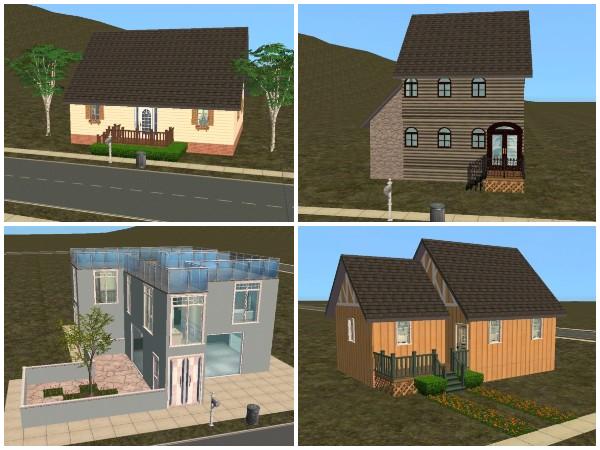
Beacon Falls Starter and Beacon Falls Bigger are the two houses seen at the top of the picture. They have been built in a similar style, with the starter being obviously smaller, is more basically furnished and has no external decor. I believe these require Seasons.

3 and 6 Belisha Point require the Mansions and Gardens SP, and are the two houses which can be seen at the bottom of the picture.
I made these for specific sims, and they are set in the left hand corner of Lustre Point, nearer the waters edge and towards the corner, opposite Lustre Park in my own game.
Pictures of the front and back of 6 Belisha Point can be seen in the middle and right hand side, this was based on a lot that I think I saw on Insiminator, I had been unable to install it properly. I remember I liked it enough to try to recreate it, but having checked there, I can't give credit to the original creator for the idea because their features page doesn't seem to go back far enough, and I can't find it in the list of downloadable lots. If you know who it made the first version, then please contact me and I will happily change this section to give full thanks, credit and a better link. (I think theirs was a beach lot)

Download LustrePoint_NEW_Houses

LustrePoint_Redone Houses
These are edited lots which can already be found in Lustre Point, I have uploaded them for people to add to or replace some of the Lustre Point lots which had been used several times over in order to fill out the neighborhood.
Pictures of the interiors and backs have been included in the folder, so that you can see what you're actually getting. These have been built and furnished in a full EP/SP game, and so require the Mansion and Gardens SP. If you are missing any of the other packs I might have used while putting them together, they should still install correctly and show up in your game, but I would advise you to check and see if any decor needs replacing, or if there are any furniture items missing.

Download LustrePoint_Redone Houses

LustrePoint_Redone as Apartments

There is another non pictured lot included in the download, which looks similar to the house on the top right hand side. These were lots that had been made a long time before the Apartment Life EP was ever mentioned or released, but were built and styled as if they should be apartments. Someone suggested them being updated and made to function as actual apartments, so here they are!
These have been updated in a full EP/SP game, and they require the Mansion and Gardens SP. If you are missing any of the other packs I might have used while putting them together, they should still install correctly and show up in your game, but I would advise you to check and see if any decor needs replacing, or if there are any furniture items missing.

Download LustrePoint_Redone as Apartments